.svg)
How We Manage $300K/Month in Ad Spend With Claude Code


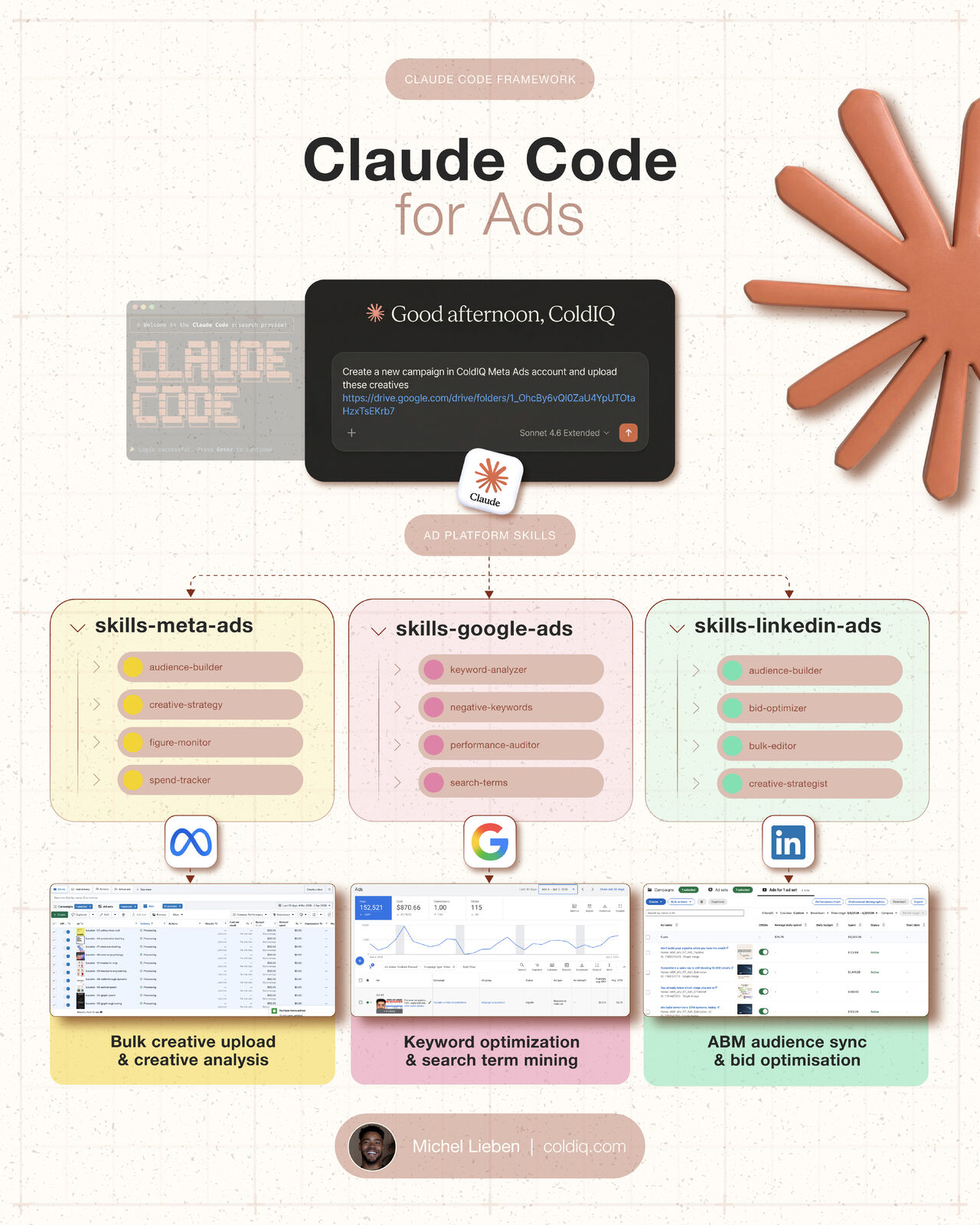


We manage over $300,000 per month in ad spend across Google, Meta, and LinkedIn. All from the terminal, using Claude Code.
Ivan Falco, our Head of Growth, built a set of custom skills based on 300+ hours running paid ad campaigns for our clients. The kind of campaigns that consistently deliver over 4X ROAS on more than $1M in total spend.
These skills doubled our ad operations output without sacrificing quality. They execute bulk edits across platforms, upload custom audiences, detect creative fatigue, generate reports, tweak bids, and flag issues before they burn budget.
Here is what the full setup looks like, broken down by platform.
1. What Claude Code Skills Are (And Why They Matter for Ads)
A Claude Code skill is a structured set of instructions that tells the AI how to interact with a specific platform or API. You drop a skill into your project, connect your ad accounts, and then tell Claude Code what you need in plain English.
It reads the skill, plugs into your ad platform, and executes.
For paid ads, this changes the workflow completely. Instead of clicking through dashboards, pulling exports, comparing date ranges manually, and adjusting bids one campaign at a time, you describe what you want and Claude Code handles it.
The result is faster execution with fewer errors. When you are managing dozens of campaigns across three platforms for multiple clients, that speed compounds fast.
2. Google Ads: Eliminating Wasted Spend
Google Ads is where most ad budgets go to die quietly. Search terms drift, quality scores decay, and performance shifts happen between your weekly check-ins. These four skills keep everything tight.
Keyword Analyzer
This skill audits quality scores across your entire account and uncovers keyword gaps. Instead of manually reviewing hundreds of keywords in the Google Ads interface, you ask Claude Code to surface the ones underperforming or missing entirely.
It flags keywords where your quality score dropped, identifies gaps your competitors are bidding on, and recommends adjustments. This used to take a full morning per client. Now it takes minutes.
Negative Keywords
Wasted spend hides in search terms. This skill reviews every search term triggering your ads and eliminates the ones burning budget. It catches irrelevant queries, near-miss keywords that look relevant but convert at 0%, and broad match terms that drifted far from your intent.
Running this weekly across all client accounts used to require a dedicated analyst. Now it is a single command.
Performance Auditor
This skill compares performance across time periods and surfaces what shifted. Did CPAs spike? Did a campaign that was printing leads suddenly slow down? Did a new ad group outperform the rest?
Instead of pulling reports, building pivot tables, and comparing manually, you tell Claude Code the date ranges and it delivers the analysis with specific recommendations.
Search Terms Analyzer
The search terms skill identifies queries that are actively burning budget with zero conversions. It goes beyond basic negative keyword management by quantifying exactly how much each underperforming query has cost and recommending whether to exclude, pause, or restructure.
This is where the biggest savings happen. On accounts spending $50K+ per month, we regularly find $3,000 to $8,000 in monthly waste hiding in search term reports.
We built a tool that analyzes your GTM performance in seconds, including ad campaign metrics, based on the same data infrastructure powering these skills.
You can get a full GTM performance report for your company here, for free:
GTM Reports Tool
3. Meta Ads: Catching Fatigue Before It Kills Performance
Meta Ads degrade differently than Google. Creative fatigue is the silent killer. Your ads work brilliantly for two weeks, then frequency climbs, CTR drops, and CPAs double. By the time you notice in a dashboard, you have already wasted a week of spend.
These skills catch it early.
Audience Builder
This skill converts CRM lists into Meta custom audiences directly from the terminal. Upload a CSV of your best customers, and it creates a custom audience ready for targeting or lookalike expansion.
For B2B companies running account-based campaigns, this eliminates the manual process of exporting from your CRM, formatting the file, uploading through Business Manager, and waiting for the match rate. One command handles everything.
Creative Fatigue Analyzer
This is the skill that saves the most money on Meta. It monitors CTR trends across all active creatives and flags the ones showing early signs of fatigue before the performance cliff hits.
When a creative starts losing engagement, the skill recommends whether to pause it, refresh it, or let it run a few more days based on spend and conversion data. This prevents the classic mistake of running winning creatives into the ground.
Fatigue Monitor
While the creative fatigue analyzer focuses on individual ads, the fatigue monitor looks at audience saturation. It flags when your target audience has been exposed to your campaigns too many times, which means your reach is capped and costs are rising.
This is especially critical for LinkedIn retargeting audiences on Meta, where the pool is small and saturation happens fast.
Spend Tracker
This skill monitors budget pacing across all Meta campaigns in real time. It catches overspend before it happens and identifies campaigns that are underpacing, so you can redistribute budget to what is working.
On accounts managing 20+ campaigns simultaneously, manual budget tracking breaks down. This skill keeps every dollar accountable.
With these skills running across your Meta account, you can also identify which companies in your pipeline are showing intent signals that should inform your targeting.
You can check which companies are actively showing buying signals in your space here, for free:
Intent Signals Tool
4. LinkedIn Ads: Scaling Without the Manual Grind
LinkedIn Ads is the most powerful B2B ad platform and also the most tedious to manage at scale. Everything from audience creation to bid management requires more clicks than it should. These skills remove the friction.
Audience Builder
This skill generates targeting audiences at scale. Feed it a list of companies, job titles, or LinkedIn profile URLs, and it builds the audiences directly through the API.
For ABM campaigns where you need separate audiences per tier, per vertical, or per signal type, this turns hours of manual work into a single batch operation.
Bid Optimizer
LinkedIn bidding is notoriously expensive and opaque. This skill adjusts bids across campaigns in bulk based on performance data. It identifies which campaigns are overbidding relative to their conversion rates and which are underbidding and missing impression share.
Running this daily keeps your LinkedIn CPL from creeping up, which is the default behavior on the platform if left unattended.
Bulk Editor
This is the workhorse skill for LinkedIn. It handles mass edits to campaigns, ads, and naming conventions in seconds. Rename 50 campaigns to match your new taxonomy? Done. Pause all campaigns in a specific region? Done. Update UTM parameters across every active ad? Done.
The time savings here are enormous. LinkedIn's native interface was not designed for bulk operations, and this skill fills that gap completely.
Creative Builder
This skill produces ad creatives from brand specs. Feed it your brand guidelines, value propositions, and target personas, and it generates ad copy, headlines, and descriptions ready to launch.
It does not replace creative strategy. But it eliminates the bottleneck of producing 20 variations of the same ad for A/B testing.
When building audiences for LinkedIn Ads, it helps to start with a strong list of target companies. We built a tool that finds companies similar to your best accounts, which pairs perfectly with LinkedIn audience targeting.
You can find companies similar to your best customers here, for free:
Lookalike Finder Tool
5. How to Set It Up
The setup is straightforward:
→ Drop the skills into your Claude Code project directory
→ Follow the setup instructions to connect your Google, Meta, and LinkedIn ad accounts via their APIs
→ Tell Claude Code what you need in plain English
For example: "Audit my Google Ads search terms from the last 30 days and flag anything spending over $100 with zero conversions." Claude Code reads the relevant skill, connects to the Google Ads API, pulls the data, and delivers the analysis.
You can chain commands too. "Run the negative keyword analysis, then check creative fatigue on Meta, then pull the LinkedIn bid optimization report." It executes sequentially, and you get everything in one session.
The skills are designed to work independently or together. Start with the platform where you spend the most, get comfortable with the workflow, and expand from there.
6. What Changes When You Run Ads From the Terminal
The shift from dashboard-based ad management to terminal-based operations changes three things:
→ Speed: Tasks that took 2 to 3 hours per client now take 15 to 20 minutes. Across a portfolio of clients, this compounds into days of time saved per week.
→ Consistency: Skills execute the same checks every time. No steps get skipped because someone was rushing before a meeting. No search term reports get deprioritized because the team was busy with creative reviews.
→ Scale: Adding a new client account does not proportionally increase the workload. The same skills run on one account or twenty. The marginal cost of managing additional spend approaches zero.
This is what let us double our output. The campaigns did not change. The strategy did not change. The execution layer got faster and more reliable.
When you are running this kind of ad infrastructure, you want to know what tools your prospects and competitors are using. Understanding their tech stack helps you position your ads more precisely.
You can check any company's tech stack here, for free:
Tech Stack Finder Tool
7. Conclusion
We went from managing ad spend with spreadsheets, manual audits, and weekly review cycles to running everything through Claude Code skills.
The numbers speak for themselves:
→ Over $300,000 per month in managed ad spend across three platforms
→ 2x output increase without adding headcount
→ Consistent 4X+ ROAS on campaigns exceeding $1M in total spend
→ Faster issue detection, less wasted budget, better allocation decisions
Ivan Falco built these skills from real campaign experience, not theory. Every skill exists because we hit a specific bottleneck running ads at scale and needed a faster way to solve it.
If you are managing paid ads for B2B companies and spending time on repetitive platform tasks, this is the setup worth exploring.
---


FAQ
Claude Code skills are structured instruction sets that tell the AI how to interact with ad platform APIs like Google Ads, Meta Ads, and LinkedIn Ads. You drop them into your Claude Code project directory, connect your ad accounts through their respective APIs, and then describe what you need in plain English. Claude Code reads the skill, plugs into the platform, and executes the task. This replaces the manual process of clicking through dashboards, pulling exports, and making adjustments one campaign at a time.
The creative fatigue analyzer skill monitors click-through rate trends across all active Meta ad creatives and flags those showing early signs of performance decline before the full drop-off hits. It analyzes spend and conversion data alongside CTR patterns to recommend whether to pause, refresh, or continue running each creative. A separate fatigue monitor skill tracks audience saturation levels, flagging when your target audience has been overexposed and frequency is driving costs up. Together, these two skills prevent the common mistake of running winning creatives past their peak performance window.
How much ad spend can you manage with Claude Code skills?
What results does Claude Code deliver for paid ad management?










Let's Get Started!
Schedule a 30-minute call with ColdIQ leadership to learn how our outbound strategy and sales tools help generate qualified leads and close deals.
.avif)


