.svg)
Interactive Cold Email Guide

Table of Contents
- Introduction
- Chapter 1: Generate a Prospect's Account List
- Chapter 2: Target the Right Person
- Chapter 3: Build Your Contact List
- Chapter 4: Contacting Prospects at Scale
- Chapter 5: Write High-Converting Messages
- Chapter 6: Deliverability Infrastructure
- Chapter 7: Build Your Sales Stack
Free Tools & Resources
Acknowledgements
This guide was written and prepared by the team at ColdIQ.
It results from 5 years of cold outreach experimentation, 1000+ campaigns launched, millions of cold emails sent and constant iterations.
The processes, workflows, and tool stack described in the guide are the closest representation of internal ColdIQ’s workflows. Don’t hesitate to share if it is helpful.
If you wish to work with us, you can learn more about our services via our homepage.
Introduction
Outbound Prospecting as an acquisition channel
There are many ways to find new customers. Among these, outbound often gets a bad reputation. Our prospects are bombarded with messages daily (your inbox probably is, too!)... do we want to contribute to this?
Yet, outbound has numerous advantages over other acquisition methods:
- Unlike digital ads, it does not require a large budget.
- Unlike inbound strategies, results (and feedback) are instant, you’ll find out what works fast.
- Unlike word of mouth, you don't need an extensive network of contacts or to have served many clients (that will refer you).
The problem with outbound sales today
Very few companies manage to make outbound sales work for them. Why is that?
Take a moment to think about the messages flooding your inbox.
Most of the time, they are impersonal, irrelevant, poorly written and far too long.
Do you like reading long, irrelevant messages? No one does.
Now, picture this:
[1] You’re struggling with an issue in your business.
[2] Someone reaches out to you.
The message is short.
The sender did their research.
Their message is straight to the point.
It is showing (or teasing) how to solve your problem.
…And most importantly, it actually lands in your main inbox.
How would you feel if every email you were getting was an answer to your problems?
Would you like that more? I bet you would.
While we can’t change most organizations’ outbound practices, we can contribute to making the space a bit better.
The biggest problem with outbound is that most sellers don’t know why they’re reaching out to the person they’re reaching out to. You shouldn’t know for sure — but you should at least have an opinion about why contacts have a place on your list.
This should serve as the basis of your outbound efforts 👇
You want to identify people and companies struggling with a problem you can solve.
The first goal of this document is to show you how to identify problems at scale and reach out to companies that most likely need your help. Then, we’ll show you how to make this process more efficient by leveraging sales tech and copywriting best practices.
Ingredients of successful cold email campaigns
The best cold email campaigns include most of these elements:
- A verified list of prospects who could genuinely benefit from your solution.
- Short but punchy copywriting that highlights their pains and our solution.
- Personalised and relevant messages tailored to each individual.
- Proof of being able to solve the prospect’s problem.
- Top-notch deliverability to land in inboxes. (Important!)
- Valuable, helpful assets.
Chapter 1 | Generate a prospect’s account list
Identifying companies with a problem
In an ideal world, you would snap your fingers and get a list of all the companies struggling with the issue you aim to solve. Unfortunately, the best thing we can do is guestimate and do our research.
You might have heard some prominent figures in the outbound space mention the term “problem sniffing”. The idea is to derive a problem based on companies’ public activities.
An efficient way to do this is by looking at what we call ‘trigger events’, ‘sales triggers’ or ‘intent signals’.
Here are a few examples for companies:
- change in the industry likely to impact businesses
- hiring trends and headcount growth/reduction
- recent vacancies in roles
- opening of new office locations
- appointment of a new c-level
- launch of a new product
- increase in ad spend
- webinar/event attendance based on an industry topic
- targeted groups
- merger/acquisition
- a fundraising
There are many more, but you get the gist. All these events typically precede changing needs within new companies, needs that you might be able to solve.
If you’re looking for a more exhaustive list of triggers, we prepared one here.
From problem to targeting
To understand how to derive potential issues from triggers… let’s explore a couple of situations and how we think through these.
[1] Imagine you’re selling HR software.
*One of the issues you solve is helping companies with a high churn rate (that is, employees leave after only a short tenure). Businesses would pay for such software because hiring and training new people is very costly.
If the process has to be repeated more often because employees are leaving, the cost can be in the hundreds of thousands. The business case here is pretty straightforward. Companies can implement software that helps decrease churn for a subscription that costs a few hundred dollars monthly. This reduces employee churn, saving companies hundreds of thousands of dollars per year.*
Now, who should you go after?
Every company could benefit from your solution, right? So why not enrich the contact information of every CEO on the planet 🌎, ask them if they’re struggling with employee churn and pitch our features?
The problem here is that most recipients won’t be receptive to your pitch. It’s not that your product isn’t helpful. It’s that they’re not experiencing the pain. They’re getting flooded by messages in their inbox. If your outreach isn’t relevant, it’s going to get ignored. Unfortunately, when your outreach gets outright ignored, it also impacts your deliverability, causing a domino effect.
Who’s most likely to experience the pain?
In an ideal world, you already know what your ideal customer profile (ICP) is facing. The easiest way to uncover this data is to go through your existing client base (or prospects) and ask the following question:- what made them want to reach out to you? What really made them want to buy?
If you analyze enough deals or sales calls, it’s very likely that you’ll notice some patterns. In the case of our sales prospecting agency, we noticed that a good proportion of companies scheduling a call with us are suffering from low deliverability. Not every sales team suffers from this issue, but for the ones who do, it’s almost impossible to get results via cold emails. In our case, we can also combine this with the recent rule & regulation changes to Google & Outlook, which made it significantly tougher to consistently land in the main inbox.
Now we understand the pain, the question becomes ‘how do I find companies with bad deliverability?’ We can look at companies that: haven’t properly configured their email & domain infrastructure, companies that are attending an ‘email deliverability’ webinar, or prospects who are hiring for an email deliverability expert or perhaps an SDR with the idea to handle it manually.
If we can get this data, then we will improve our conversion rates.
Now, in many cases, you won’t know for sure what is the trigger event that makes the pain hurt enough to compel your ICP to react. If you don’t know— it is the #1 question you should find the answer to. This is what we spend most of our time brainstorming with clients.
We ask them to identify some patterns within companies that would make them a great fit. If they’re unsure, we think of situations where the pain is likely to be stronger. Based on these, we build hypotheses that we will try to validate (or invalidate).
In our previous ‘HR software’ example, here are some potential ‘buying signals’ we thought of:
→ A company had bad employee reviews on Glassdoor👇
If they’re getting too many bad reviews, they’re likely experiencing above-average churn. This makes it more likely that they’ll be in the market for software that helps fix that.
→ A company is partly or wholly remote👇
It’s more difficult to monitor employee well-being when you don’t see people face-to-face. Remote teams could benefit more from the solution than in-person teams.
→ The average tenure is shorter than 6 months 👇
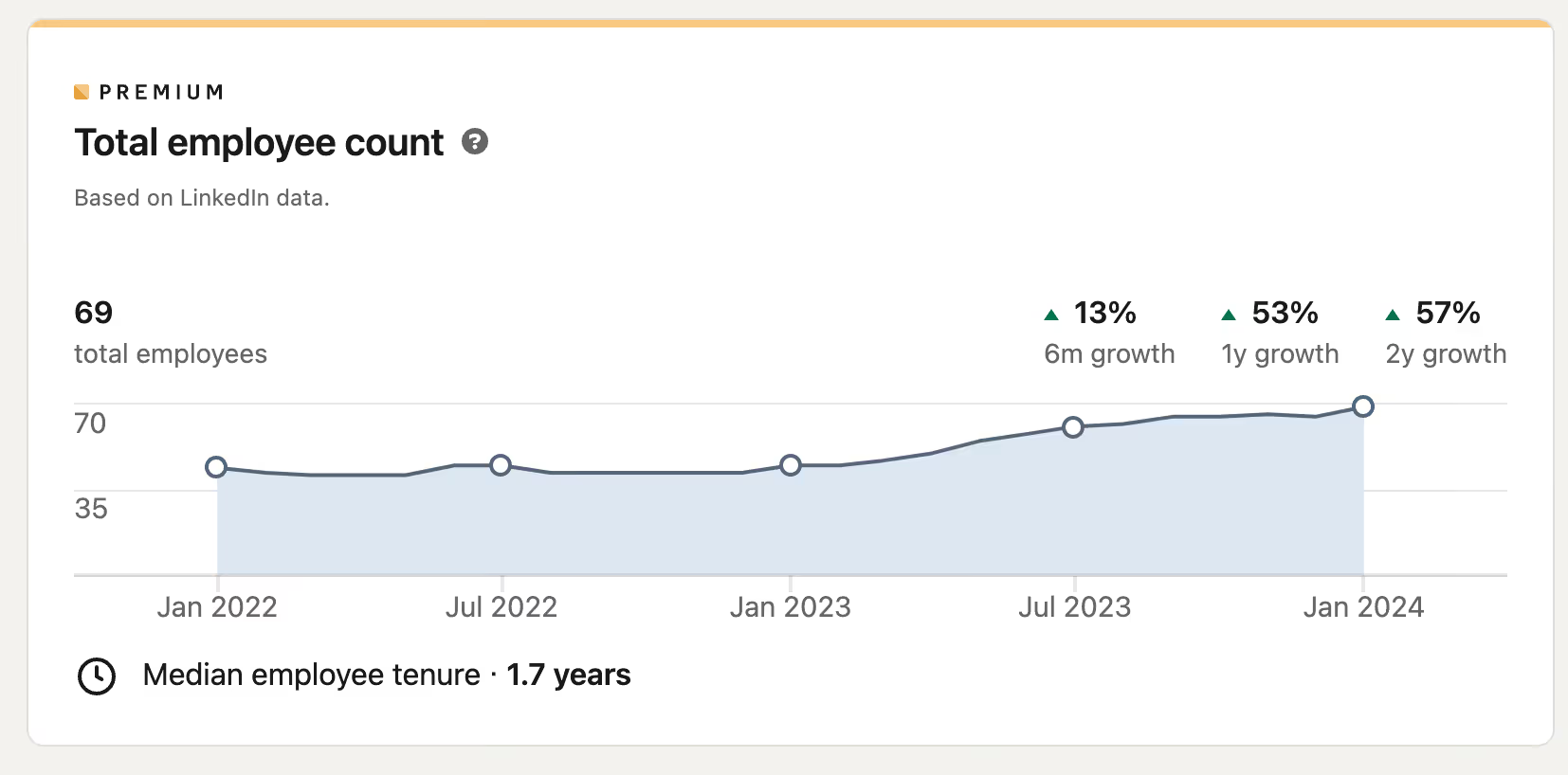
Once you’ve built a few hypotheses, you want to confront them to the market. *It might be true that fully remote companies have more trouble monitoring employee well-being. But it might also be true that the c-level in these remote organizations care less because they haven’t ‘bonded’ as much with the employees.*There’s only one way to find out, and it’s by reaching out to these companies. The first step is finding the data & testing your theory.
Finding data on best-fit accounts
*Now that we built the hypothesis that remote organizations are a great fit for us, the next question is how do we build a list with such companies? There are several ways to do this, but the best we found was to look at companies hiring remotely.
We’ll go deeper into data sources, but in this case, we’ve done that with Clay*. They have a few integrations that let you find information on open job data. We figured that every company that had ‘Remote’ in their job opening had—at least—part of their team working remotely.
If you identified a trigger event for which your current tool doesn’t have data, you can have a look at this extensive list of B2B data sources in our **AI Data Enrichment** section here.
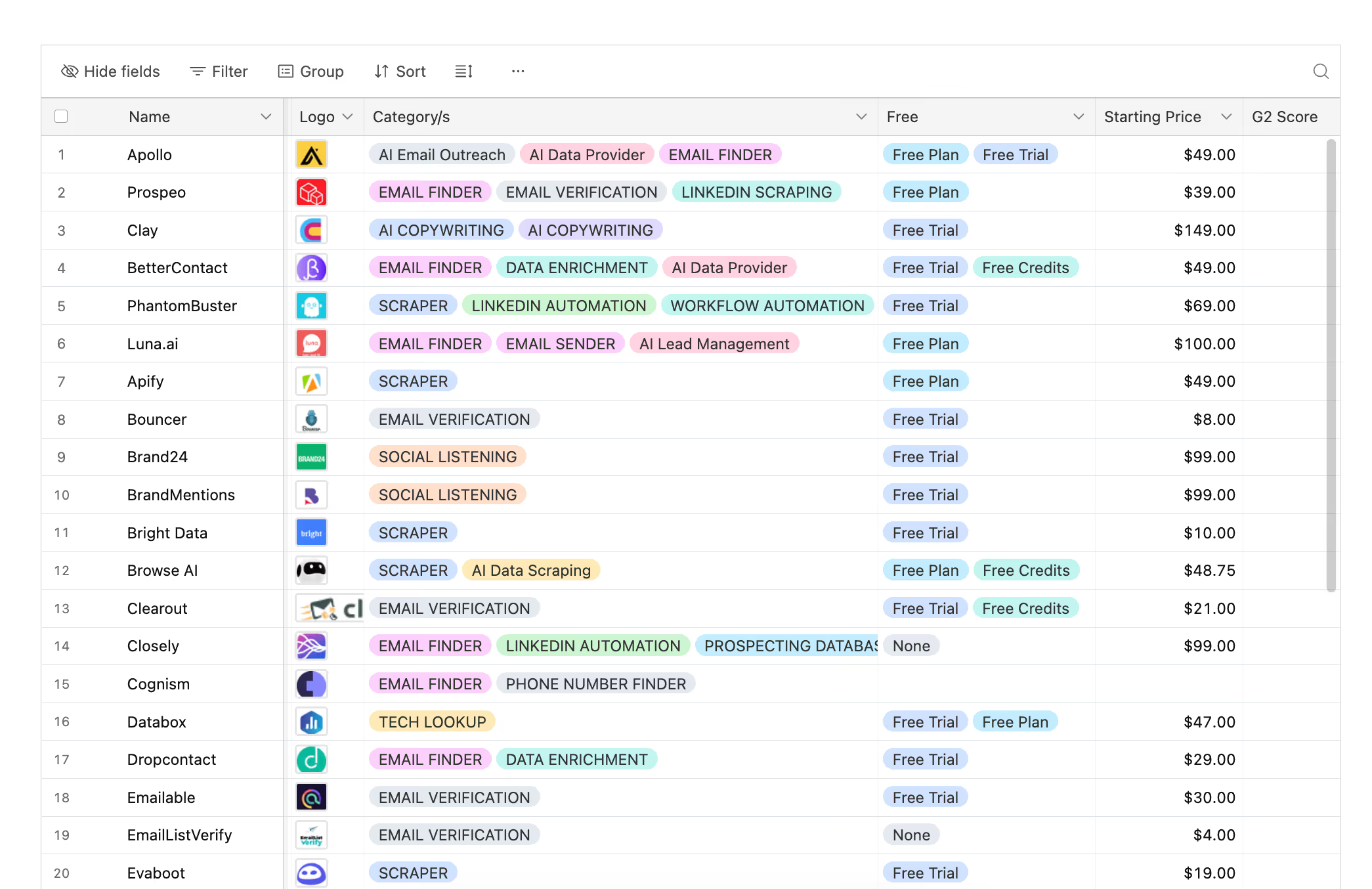
If you already have a few ideal customers, one of the fastest way to build your target account list is to find companies similar to your best clients. This approach lets you leverage what's already working instead of starting from scratch.
→ Find companies similar to your ideal customers:
To find such data at scale, I’d recommend:

Ocean helps sales teams find the best companies and contacts to target by identifying lookalike accounts and contacts.
Plans start at $79/mo
Identifying initiatives
Sometimes, there might not be any obvious problem to sell to. It might make more sense to sell to companies’ current initiatives.
The same logic applies to problems. Observe what companies are going through and derive a hypothesis on their current priorities.
For example, if you’re selling an advertising tool that helps companies optimize their ad spend, you may want to be on the lookout for job openings for ‘media buyer’, ‘paid media specialist’ or ‘advertising manager’.
Companies hiring for these roles are likely going to ramp up their advertising efforts. If you’re selling a solution that will help them (or their new hire) improve results in that regard, it’s a good indicator to reach out.
You can also identify opportunities by analyzing what technology stack companies are currently using. If they're using competing tools or complementary software, you'll know exactly how to position your outreach.
→ Discover the tech stack of any company:
Here are some tools I’d recommend to find out such data:

Apollo is the most efficient software to build highly targeted list of prospects.
Plans start at $39/mo

Clay finds data from 50+ sources and leverages GPT-4 to personalize emails.
Plans start at $149/mo

FullEnrich is a waterfall enrichment tool that finds emails & phone numbers.
Plans start at $39/mo
Chapter 2 | Target the right person within your target accounts
How to think about prospect targeting
The most straightforward way to find the right answer is to ask the right question. As cliché as it may sound - there are a few questions I repeat to myself, over and over, when I need to decide on my targeting.
Here are 2 of my favourites:
"What 3-5 things must be true about a lead, that were true about your last 10 best customers, that made them an awesome fit?" by Jordan Crawford
Here are some criteria you can look at to decide on your targeting:
- What are the most common job titles of your inbound leads?
- Which job titles have the highest close rate?
- What's the title of the typical buyer? Who's the individual user of your solution?
- What's the size of their company/department?
- In what departments do they operate?
- In what industry?
- Where are they located?
Another, simpler way, to think about people targeting is to simply ask: "Who's most likely to get fired if the initiative doesn't work?" by Morgan Smith
You could also ask the opposite: "Who would get promoted if the initiative were a success?"
Remember, Outreach can be a marathon as well as a sprint. If you don’t know who the ideal buyer is, this is the beautiful part of cold outbound, we can get INSTANT feedback through testing.
We’ve seen cases where targeting BTL roles had more success than targeting ATL decision makers, it’s all about finding what works, and getting your theories out there.
Try and think about which role would actually find your solution the most intriguing, is it a technical product that a CTO would get excited by? Or would it be more intriguing to message a CMO with the benefits?
Once you've identified which role to target, you need to find the people holding those positions at your target companies.
→ Find the right people at any company:
Chapter 3 | Build your contact list
Example for a list of Talent Acquisitions directors, in companies currently hiring for 10+ roles
Building a list of prospects at targeted companies hiring for a high number of roles is a great way to find organizations likely to be interested in recruitment services.
I'll show step-by-step how to create your list. Knowing the logic will assist you in adapting it to your needs:
- You could lead with companies recruiting for specific positions (e.g: Marketing Manager - helpful if you specialize in certain roles).
- You could base your targeting on: Geography, Industry, Headcount size or Headcount growth.
- You could enrich different people within the organization (in this case we went for the Head of TA/People/HR. You could even go to the Head of Department for the open positions.)
If you need help building these contact lists... or to run your prospecting campaigns. You can book a time with us here.
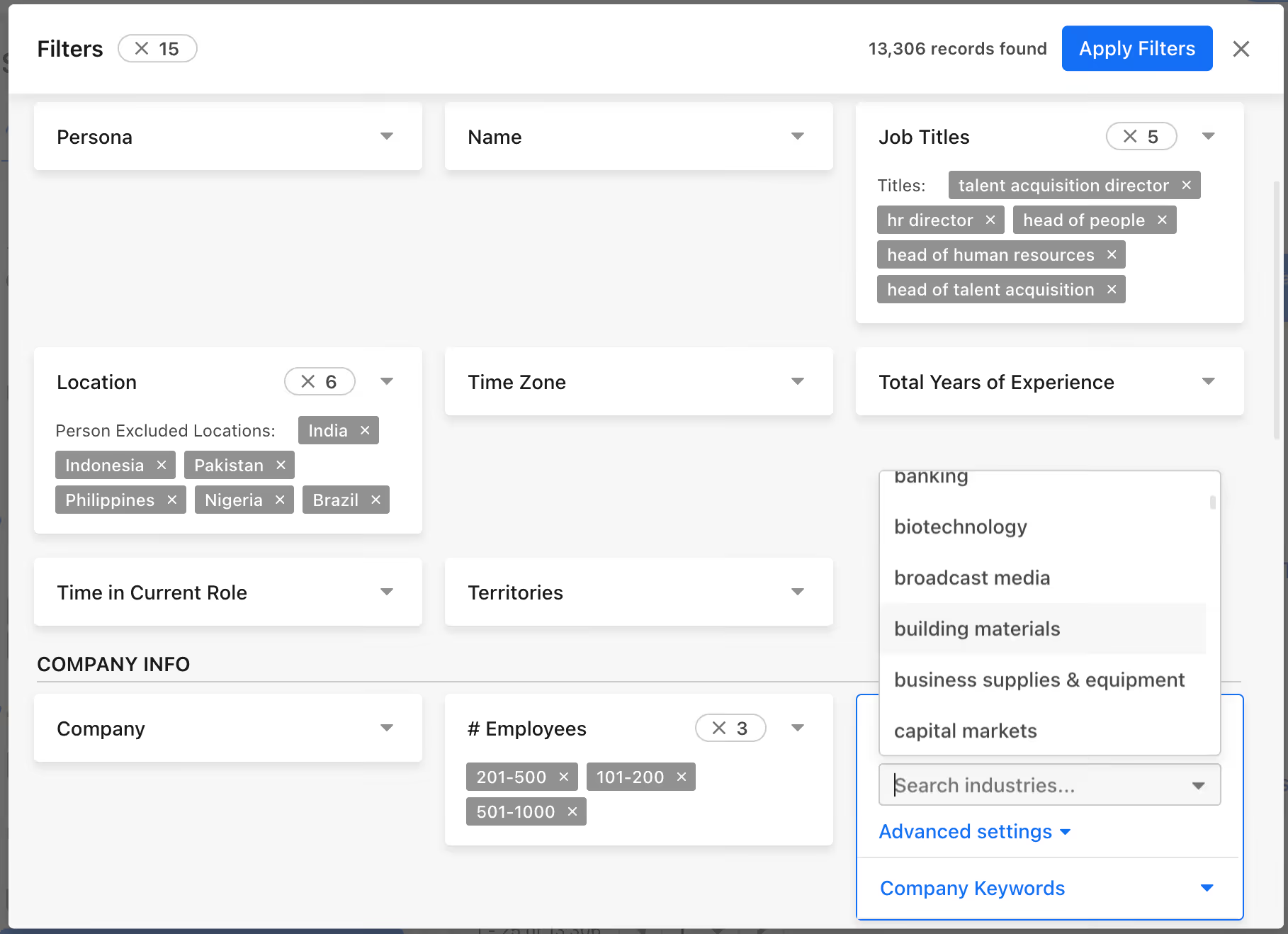
STEP 1: Filter your target by Job Title, Industry, Geography, Company Size and more.
You can use a B2B Database such as Apollo to do the initial filtering, the keyword here is INITIAL. While Apollo is a fantastic starting point, it’s very far from the finish line with a lot of their data being outdated in 2026.
As you'll see in the image below, we went a bit broad in the targeting, as we’ll narrow it down further inside another tool.
We used the following filters:
- Job Titles: Talent Acquisition Director, HR Director, Head of People, Head of Human Resources, Head of Talent Acquisition
- Location: Worldwide excluding India, Pakistan, Philippines, Nigeria & Brazil (80% of our list is US-based, this was a requirement to follow their ICP.)
- # Employees: Companies that have above 100 employees but less than 1000 employees.
We also added a condition, inside of Apollo, that the company needed to have at least one open job in the US. Apollo's job data isn’t very precise, thus we will use Clay to find the exact number of active jobs openings. Hence the saying, Apollo is a great start but very far from the finish line.
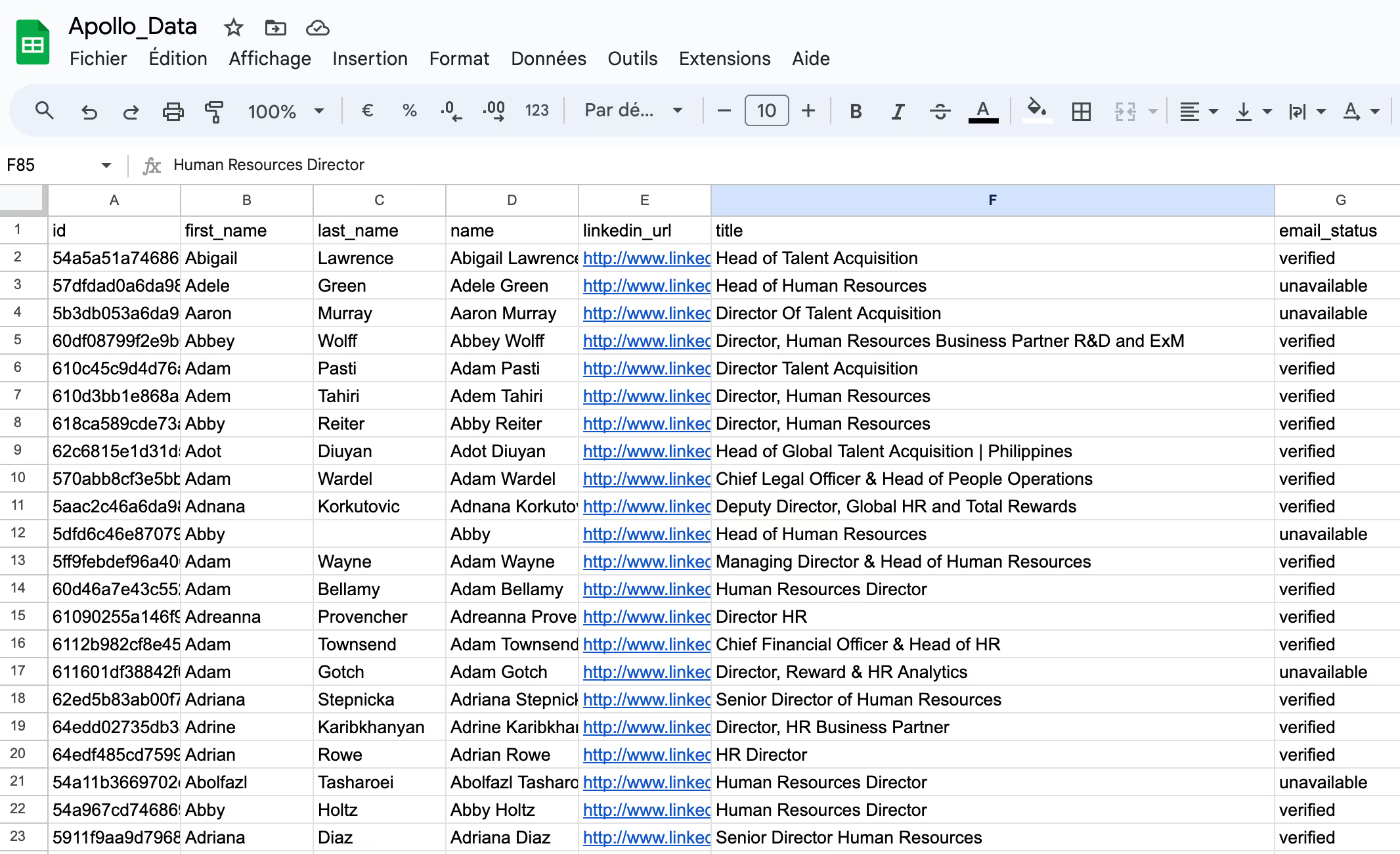
STEP 2: Export the results into a .csv file and import in Clay
Once you're done playing with filtering criteria inside of Apollo. You can export the list into a .CSV file. If you import it to Google Sheet, it should look like this:
STEP 3: Find number of active jobs opening
Clay's UI looks like most Spreadsheet tools, but don’t mistake it for being another Google Sheet. Once you import your .csv file into Clay, your initial list should look like the below .GIF.
As you'll see, despite looking like most Spreadsheet tools, Clay has some incredibly powerful capabilities that will allow us to find all the interesting data we're looking for through multiple data providers.
If you haven't heard about the tool before, I urge you to check it out here.
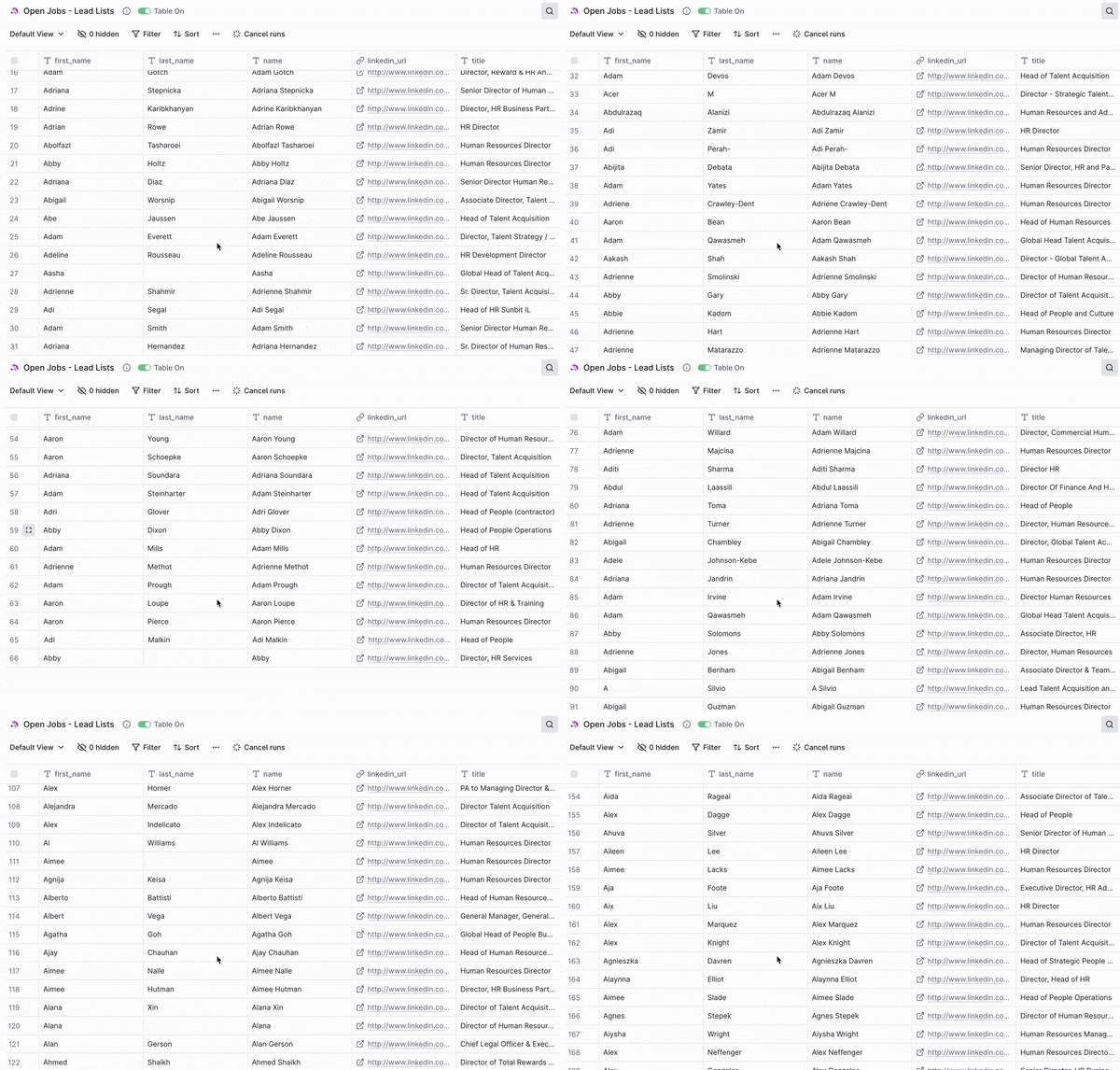
The next step is to find the number of active jobs openings inside of our target companies. Our initial file included information such as the company name and the website where each of our HR/TA/People director works. We will use one of Clay's built-in integration to look for active jobs openings.
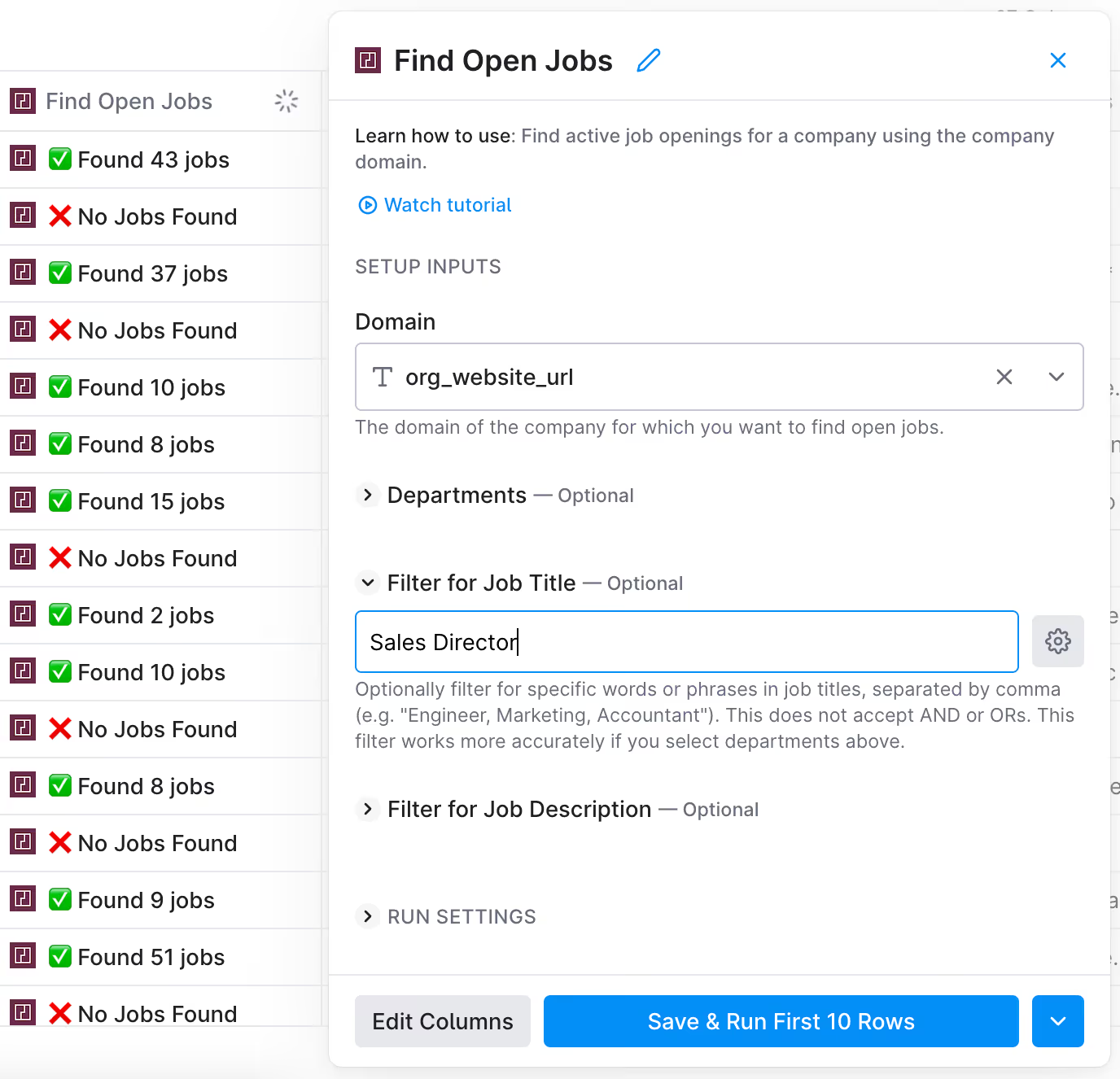
As you can see below, you have the option to filter jobs openings by Job Title. In this case, I typed 'Sales Director' for the sake of the example. If I had ran the search with the specific keyword; we would only have gotten active jobs openings for 'Sales Director' roles.
On the file above, I didn't target by specific job title, so Clay's integration found all the jobs it could.
Keep in mind that when you use this enrichment, to stick to pulling from Clay’s provided option & PredictLeads while avoiding Google. We’ve found through launching hundreds of campaigns that the Google “find jobs” enrichment is inaccurate and expensive when compared to the competition.
Because we're only interested in companies that are hiring for 10+ roles, I filtered my search to only include companies with 10+ open roles with the filter tag, and deleted out the rest:
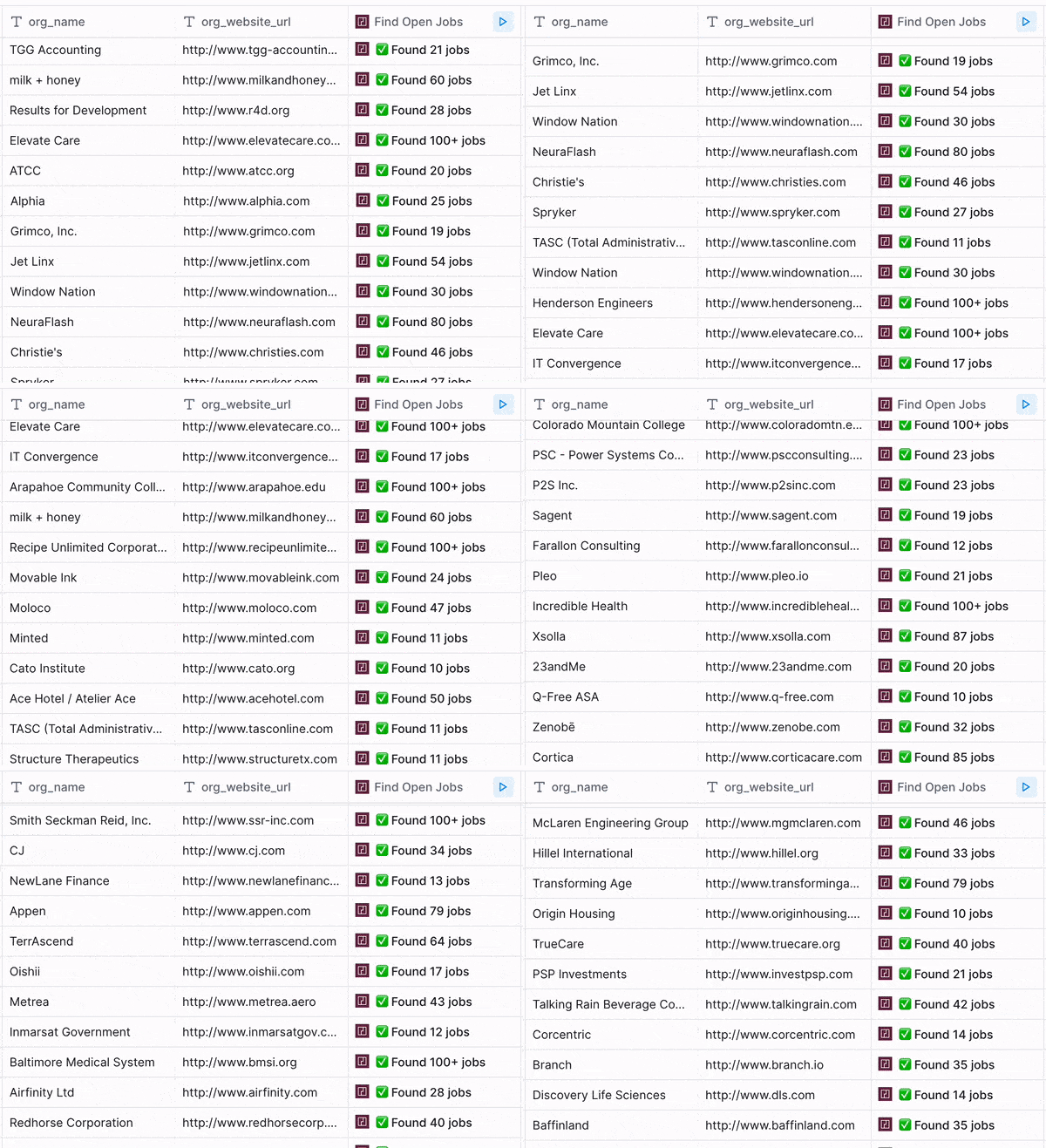
Once we've filtered down our Head of TA/HR in companies we want to go after, the final step is to find their email addresses, now if we were to do this manually, we’d be launching this campaign in 2080 and all living on Mars.
For this, we use primarly use Prospeo inside of Clay. So all you have to do is use the ‘Find Work Email’ enrichment, and watch the magic unfold in front of you. Easy? Right?
Not quite, you need to make sure that you ALWAYS validate your email lists, and that has gotten more complicated in recent times. With providers being more and more unreliable, you should aim to use a validation provider.
Alternatively, you could use FullEnrich and they’ll handle the sourcing & validation for you on their end.
This is just as important as finding their information in the first place, as you will greatly impact your deliverability and domain health without it.
→ You can find anyone's work email using our free mini tool below:
If you want to find even more email addresses than just using one provider, you can use waterfall solutions such as:
Apollo is the most efficient software to build highly targeted list of prospects.
Plans start at $39/mo
Clay finds data from 50+ sources and leverages GPT-4 to personalize emails.
Plans start at $149/mo
FullEnrich is a waterfall enrichment tool that finds emails & phone numbers.
Plans start at $39/mo
Chapter 4 | Contacting prospects at scale
Contact lists can be quite big... and consist of 1000s of contacts.
The implications are that:
[1] you won't have the time to manually reach out to them
[2] there a lot of potential new clients to get!
Now, before you get any sales engagement platform and start automating your outreach at a massive scale, there a few things you need to consider:
- your potential new clients receive hundreds of messages every day
- they can sense when your approach isn’t personal and automated
If you want to have a decent reply rate, you need to stand out. We started doing this by targeting companies based on a need, and by going after the right person inside the company.
Believe it or not, this is already better than 99% of the outreach out there. The days of sending out unpersonalized completely cold messages are almost over, not only with spam filters getting stronger, but prospects are genuinely tired of them.
But, relevant outreach is working better than ever. For example: We can leverage ChatGPT inside of Clay to personalize our outreach at scale, giving the impression every email is manually written.
The goal is for each of your outreach messages to be unique. You want your recipient to think there is no way this was for someone else.
Here's an easy way to personalize your outreach at scale:
You can do so either by leveraging trigger events (such as the fact that they are hiring) or publicly available information on them (their LinkedIn bio or their company summary).
One that we like to do is to use the job description for open roles as an [Input]. Based on the text inside of the job description, you can prompt ChatGPT to read everything and summarize the key needs for the hire.
You can then ask it to complete a sentence such as: "I saw you were hiring a {job title} that specializes in {AI-personalization}."
Notice how we’re using “AI Variables” in this case, we don’t trust GPT to write our emails for us. Most people can tell when something is written by AI, it has a certain look to it.
But through incorporating AI into small snippets inside of an email makes our already good copy even better, also giving us more control over what to test.
Here is an example of how I used News Articles to personalize a campaign at scale, following the same format as above: “I saw a recent article about {AI summary of the article}.”
Following the above steps we now have:
- a list of companies potentially interested in our solution
- the verified contact information of prospects in relevant roles inside the company
- a personalized snippet that addresses the specific needs of each company
With these, we can now reach out at scale, in a way that will feel personalized to each of our recipient.
At ColdIQ, we use:
- Instantly to automate our outreach by email.
- Lemlist or HeyReach to automate our outreach via LinkedIn.
Lemlist also has the advantage of doing multichannel outreach. They let you reach our to your contacts via email and LinkedIn. Plus, they let you send voice notes at scale.
If you’re going to run a multichannel campaign, don’t complicate the process using multiple tools, just stick with Lemlist. (They’re really good at what they do.)
Lemlist is also very strong integration-wise, so it’s ideal for sales teams that:
- need a platform with strong Hubspot or Salesforce integrations or
- a native integration with a phone dialing option.

Instantly automates your cold emails so you can close your ideal clients.
Plans start at $37/mo

Lemlist ensures you reach inboxes and send personalized cold emails at scale.
Plans start at $39/mo

HeyReach extracts leads and automates unlimited LinkedIn outreach.
Plans start at $79/mo
You read this far?
Hey - if you read this far… I’m guessing you’re really interested in cracking the code to outbound sales.
I left out quite a few details in this guide, but I promise it wasn’t on purpose. It’s just very complicated to get my point across while being comprehensive without writing a whole book...
In the next sections, I will cover sales copywriting best practices and rules to build an email infrastructure that avoids the folder of doom A.K.A…. SPAM.
That being said, if you want to discuss how to implement a prospecting system to sell your products or services... I invite you to book a time in our calendar right below 👇
30 min sales prospecting discussion
Book sales prospecting strategy session
Chapter 5 | Write high-converting messages
How to write a sequence that actually converts

Now that we covered:
- finding companies demonstrating buying intent
- finding contact information of relevant people within these companies
- personalizing part of our messages using AI
- software for automating our outreach
The hard work is almost done... Just kidding, now we have to find out how we are going to write convincing messages so that our prospects want to meet with us.
Here are a few best practices to follow when writing your messages. Both to make sure they’re read by your recipient and they don’t land in the SPAM folder:
- Write messages as short as possible.
- Avoid adding links, images, and documents.
- Individually personalize emails for your recipients, so each email is different.
- Always include spintax in your email.
- Include several touchpoints, and follow-up at least 2-3 times minimum.
- Reach out across several platforms using various formats.
(send videos, reach out on LinkedIn, via Email...)
If you're not sure what to write, don’t worry… I got your back ;).
I’m not just going to provide a framework, here’s some sequences that have performed extremely well. Not just the copywriting either, but a breakdown of the targeting behind the sequence as well. (Don’t tell our CEO about this…)
You can find the full breakdown of the sequences here.
You can find an extensive copywriting framework here.
Also, here is a post explaining the sequence I just shared. (We generated 145 leads in just 60 days.)👇
Chapter 6 | Deliverability Infrastructure
Set up the infrastructure to send 500+ emails a day while keeping a 2% reply rate.
The last, yet most essential part is to set up an email infrastructure that will allow you to send emails at scale without landing in the SPAM folder.
Unfortunately, this might just be the most complicated part of the entire process. (You can thank these new Google & Outlook rules for that…)
Half of the battle is to avoid triggering email platforms' spam filters by avoiding links, images & documents in your cold emails. Another is to avoid sending too many emails from the same inbox, inbox rotation, warm-up, etc…
The best practice is to send 30 emails a day maximum per domain, but you should stay slightly under this just to keep it safe.
It is also HIGHLY recommended to avoid using your main domain for outreach. If too many people label you as spam, the consequences can be serious and impact other areas of your business.
For example, most of your emails could land in the spam folder, even important communications with existing customers.
Even perfect technical setup won't help if your copy triggers spam filters.
→ Check here the likelihood of your email landing in spam:
Now let's talk about the infrastructure you need...
The last, yet most essential part is to set up an email infrastructure...
In summary, you need to:
- Create several domains & email accounts.
- Never track open rates, this will impact your deliverability and the statistics are inaccurate.
- Forward these new domains to your main domain (in case someone tries to look you up).
- Configure your SPF, DKIM & DMARC records for each of these domains.
- Limit your sending volume to 20 emails per domain per day.
- Single tenant “admin panel” per domain
And finally, you will want to use email warming software to improve the reputation of these new domains.
Deliverability is a dense subject in itself. If you want to learn more about it, I recommend that you read this great article by Mailreach on how to prevent your emails from going to SPAM.
If you use several email inboxes - you’ll save a lot of money by using a sending solution that doesn’t charge per email profile. You can use Smartlead, which lets you use an unlimited number of email profiles.

Mailreach is the best email warm-up tool to land in the inbox every time.
Plans start at $25/mo

Warmbox email warm-up software improves your inbox reputation.
Plans start at $15/mo

Smartlead lets your automate an unlimited number of email accounts.
Plans start at $39/mo
Chapter 7 | Building your sales stack for prospecting campaigns
- Ivan Falco (Growth): https://www.linkedin.com/in/ivanfalco/
- Michel Lieben (Co-Founder & CEO): linkedin.com/in/michel-lieben/Harry Mason
- Harry Mason (Senior GTM Engineer): linkedin.com/in/harry-mason/Alex Vacca
- Alex Vacca (Co-Founder & COO): linkedin.com/in/alex-vacca/
How to build a Sales Stack from scratch
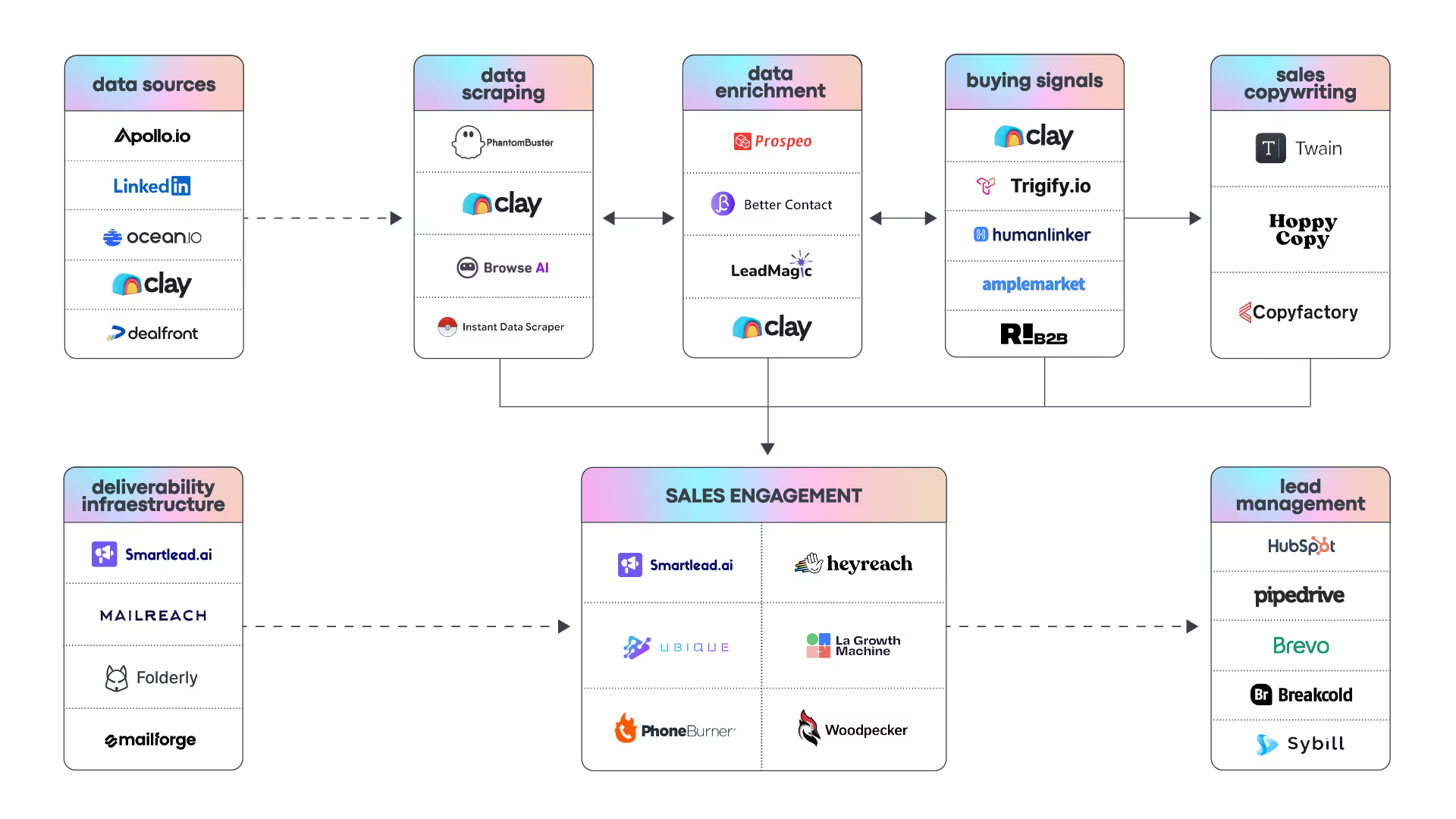
Wrapping this up...
This is all for now. I hope you learned a thing or two by reading this guide!
If you want to connect, don't hesitate to send us an invite on LinkedIn:
Last but not least, we also have a Newsletter that you’ll like if you found this guide valuable, you can sign here: https://www.coldiq.com/sales-tech-lab
See you around!